
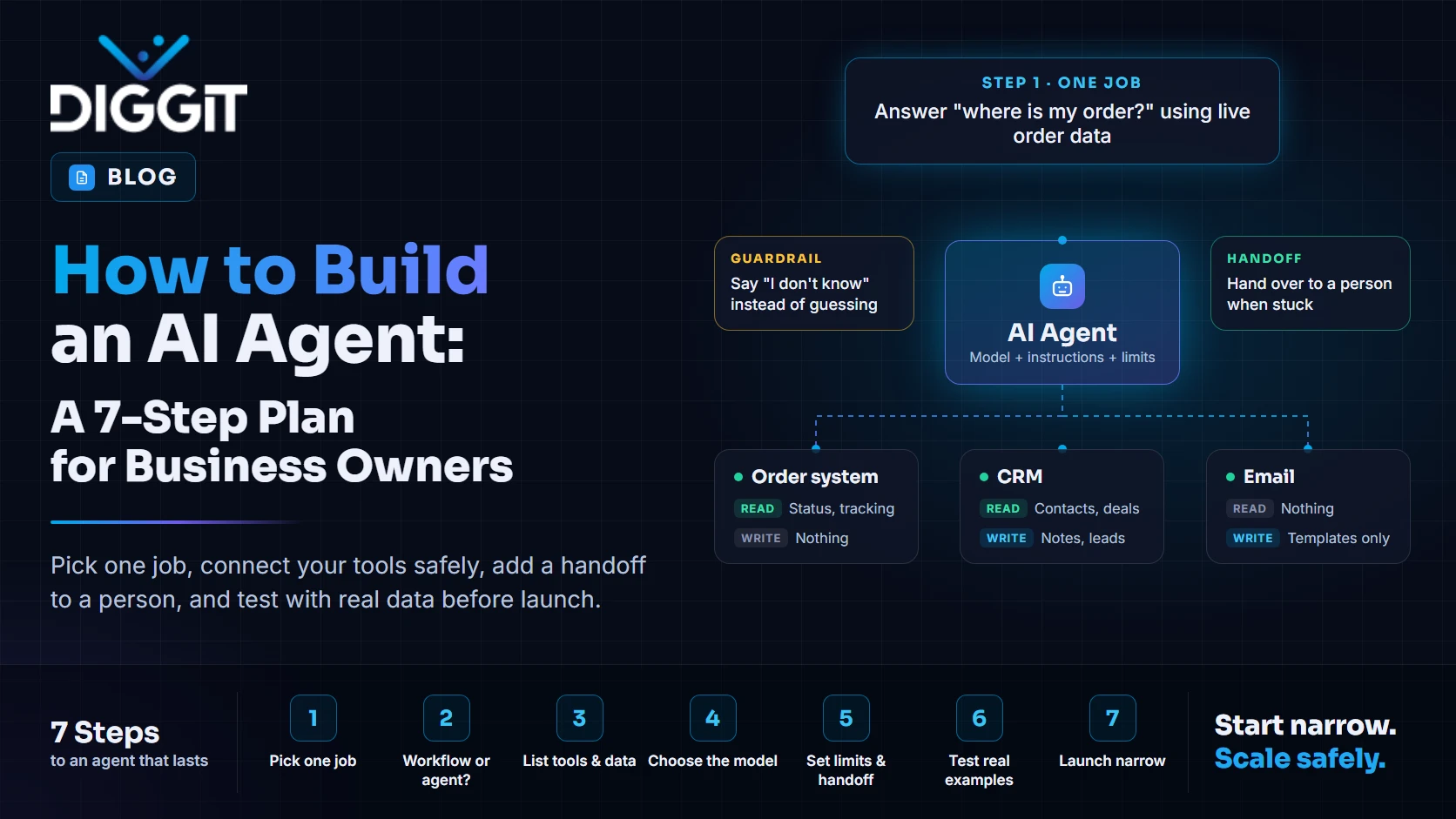
To build an AI agent, pick one job you want done, list the tools and data the agent needs to do it, connect a language model to those tools, write clear instructions and limits, and test it against real examples before anyone relies on it. The model is the easy part. Most of the work is in choosing a narrow job, connecting your systems safely and deciding when the agent should hand over to a person.
Many agent projects never make it past the pilot. Gartner predicted in June 2025 that over 40% of agentic AI projects will be canceled by the end of 2027, citing escalating costs and unclear business value. The steps below are designed to avoid both.
What an AI agent is, and what it isn't
An AI agent is software that uses a language model to decide what to do next and then does it, using tools such as your CRM, your order system or your email.
Anthropic's engineering guide, Building effective agents (December 2024), draws a useful line:
- Workflows follow steps you've defined in code. The model fills in parts, but the path is fixed.
- Agents decide their own steps and which tools to use, based on the task.
Its advice is to find the simplest solution possible and only add complexity when needed. Many "agent" ideas are better built as workflows. That's good news: workflows are cheaper, faster and easier to test.
Be careful with vendors, too. Gartner estimates only about 130 of the thousands of agentic AI vendors are real. Many are chatbots or assistants that have been renamed.
| Chatbot | Workflow | Agent | |
|---|---|---|---|
| Answers questions | Yes | Yes | Yes |
| Takes actions in your systems | Rarely | Yes, in a fixed order | Yes, in the order it chooses |
| Handles tasks with unknown steps | No | No | Yes |
| Easiest to test | Yes | Yes | No |
Step 1: Pick one job with a clear finish line
Good first jobs are frequent, repetitive and easy to check. For example:
- Answer "where is my order?" using live order data
- Qualify inbound leads and book a call
- Turn a signed quote into an invoice and send it
Bad first jobs are vague ("help the sales team") or high-risk ("approve refunds of any size"). If you can't say what "done" looks like in one sentence, the job isn't ready for an agent.
Step 2: Decide: workflow or agent?
Ask one question: do you know the steps in advance?
- If yes, build a workflow. The model reads, writes or classifies at each step, and your code controls the order.
- If no, because the steps change with every request, build an agent.
Anthropic's guide says agents suit "open-ended problems where it's difficult or impossible to predict the required number of steps." Most business tasks aren't like that.
Step 3: List the tools and data it needs
Write down every system the agent must read from or write to, and what it may do in each:
| System | Read | Write |
|---|---|---|
| Order system | Order status, tracking | Nothing |
| CRM | Contact, deal history | New notes, new leads |
| Nothing | Send from approved templates only |
Give the agent the smallest set of permissions that gets the job done. An agent that can only read orders can't accidentally cancel one.
Many tools now connect to agents through the Model Context Protocol (MCP), an open standard for connecting AI models to apps and data. If your software already offers an MCP connector, the integration work is much smaller.
Step 4: Choose the model and where it runs
For most business agents, a hosted model from a major provider is the right start. Compare them on:
- Quality on your task. Test with your own examples, not benchmark charts.
- Cost per task. Agents call the model several times per request, so small price differences add up.
- Speed. A customer on chat won't wait 30 seconds.
- Data terms. Check how the provider handles your data and whether it's used for training.
Step 5: Write instructions, limits and a handoff rule
The instructions tell the agent who it is, what job it does, which tools to use and what it must never do. Three rules every business agent needs:
- Say "I don't know" instead of guessing. A confident wrong answer does more damage than no answer.
- Stay inside the job. An order-status agent shouldn't give legal or medical advice.
- Hand over to a person when the customer asks, when money or safety is involved, or when the agent is stuck.
Customers expect that last one. In a Gartner survey of 3,566 customers, 87% said companies using GenAI for customer service must provide access to a human agent.
Step 6: Test with real examples before launch
Collect 50 to 100 real requests from your inbox, chat logs or CRM. Include the messy ones: typos, angry customers, two questions in one message. Run them through the agent and score every answer:
- Was it correct?
- Did it use the right tool?
- Did it hand over when it should have?
Fix the instructions or tools, then run the full set again. Keep this test set and rerun it every time you change the model or the instructions.
Step 7: Launch narrow, then widen
Start with one channel, one job and a person checking answers. It's the same thinking as a good MVP: launch narrow, learn, then add. Watch these numbers weekly:
- Share of requests fully handled without a person
- Share of answers that were wrong
- Handovers, and the reasons for them
- Cost per handled request
Only add a second job once the first one is steady.
How much does it cost to build an AI agent?
It depends on three things: how many systems it connects to, how much testing it needs, and what it costs to run each month. A single-job agent connected to one or two systems is a small project. An agent that acts across several systems, with approvals and audit logs, is a much larger one.
Don't forget running costs. Every request uses model tokens, and agents use more than chatbots because they think and call tools in several steps. Our guide to custom software development cost explains how to estimate the build side from team size, rate and duration.
Build it yourself, use a product, or hire a team?
| Option | Good when | Watch out for |
|---|---|---|
| No-code agent builder | Simple job, few systems, you want to test the idea | Limits on logic, testing and data control |
| Ready-made product | A product already does your exact job | Paying for features you don't need |
| Custom build | The agent must work with your own systems and rules | Needs a clear scope and testing plan |
How Diggit builds AI agents
Diggit builds custom software and AI solutions from our US company in Dallas, with our engineering team in Karachi. We also build and run our own AI products, including GACS, an AI customer service agent for online stores, and Kordic, a CRM with an MCP connector. So we've had to solve the same problems in our own products: narrow jobs, safe tool access, honest "I don't know" answers and clean handovers.
Book a scoping call. Bring one job you'd like an agent to do, and we'll tell you whether it should be a workflow, an agent or not AI at all.
Related questions
Yes, for simple jobs. No-code builders can connect a model to common apps. For agents that work with your own systems, need strict limits or must be tested thoroughly, custom code is usually needed.
A chatbot answers questions. An agent can also take actions in your systems, such as looking up an order or creating a lead, and decides which steps to take.
It depends on the number of systems it connects to and how much testing it needs. A narrow agent with one or two integrations takes far less time than one that acts across many systems.
About the author: Montazir Abidy is co-founder of Diggit Software Solutions, which builds custom software for clients and runs its own products, including Kordic, GACS and Revvio. He leads business development and product strategy.